Memory Leaks in Node.js: Part 2
Memory leaks in Node.js. In this second part, we will discuss caching and unhandled promises.
We are in the golden age of software. We have tools for everything. We have the tools to make tools. We build core systems into high-level products. But one problem is common at all levels: the infamous memory leak. It is not always a bug in code; sometimes not understanding the behavior of runtime can cause it as well.
The runtime in question here is Node.js. There are a few types of memory leaks that are very common. I have written about two of them in Part 1. In Part 2, we are going to explore the other two types.
The 4 Types of Memory Leaks:
- Global resources
- Closures
- Caching
- Promises
We will focus on caching and promises today.
Caching
Caching is the most common type of memory leak in Node. I personally do not like on-disk caching; I always prefer a dedicated solution. But since this one has caused some headaches for a lot of developers out there, let's go through a simple example to see how caching can cause memory leaks.
const http = require("http");

function computeTerm(term) {
    return computeTerm[term] || (computeTerm[term] = compute());
    function compute() {
        return Buffer.alloc(1e3);
    }
}
const server = http.createServer((req, res) => {
    res.end(computeTerm(Math.random()));
});

server.listen(3000);
console.log("Server listening to port 3000. Press Ctrl+C to stop it.");
Now, let's run the following:
clinic doctor --on-port 'autocannon -w 300 -c 100 -d 30 localhost:3000' -- node server.jsFor how this load testing works, please refer to Part 1, but basically, we are using autocannon for load testing and Clinic.js for memory graph analysis. Let's see what we get.
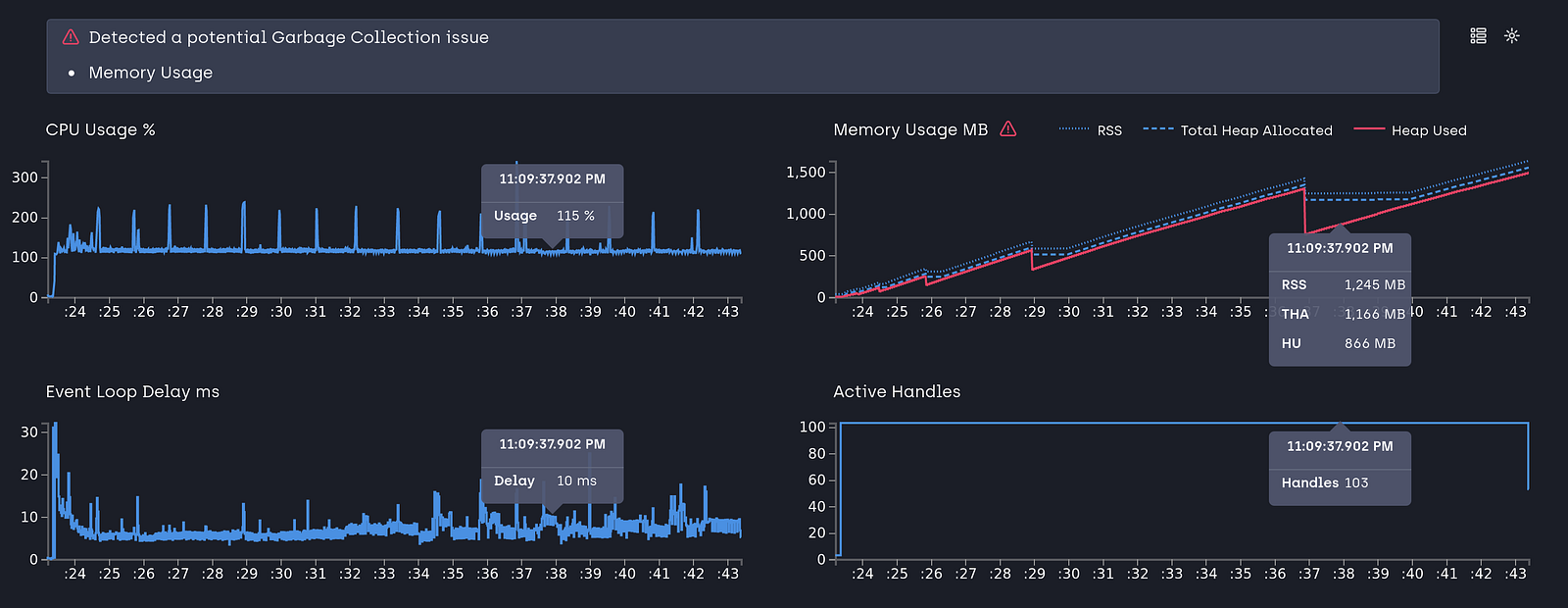
Memory is increasing fast. Let's go through what is happening in that script. We know that functions are objects in JavaScript, and we leverage that to store cached values directly on the function. We store 1KB buffer objects in the cache and use random numbers as keys. Let's take a heap dump to check what is leaking. (The heap dump process was explained in Part 1).
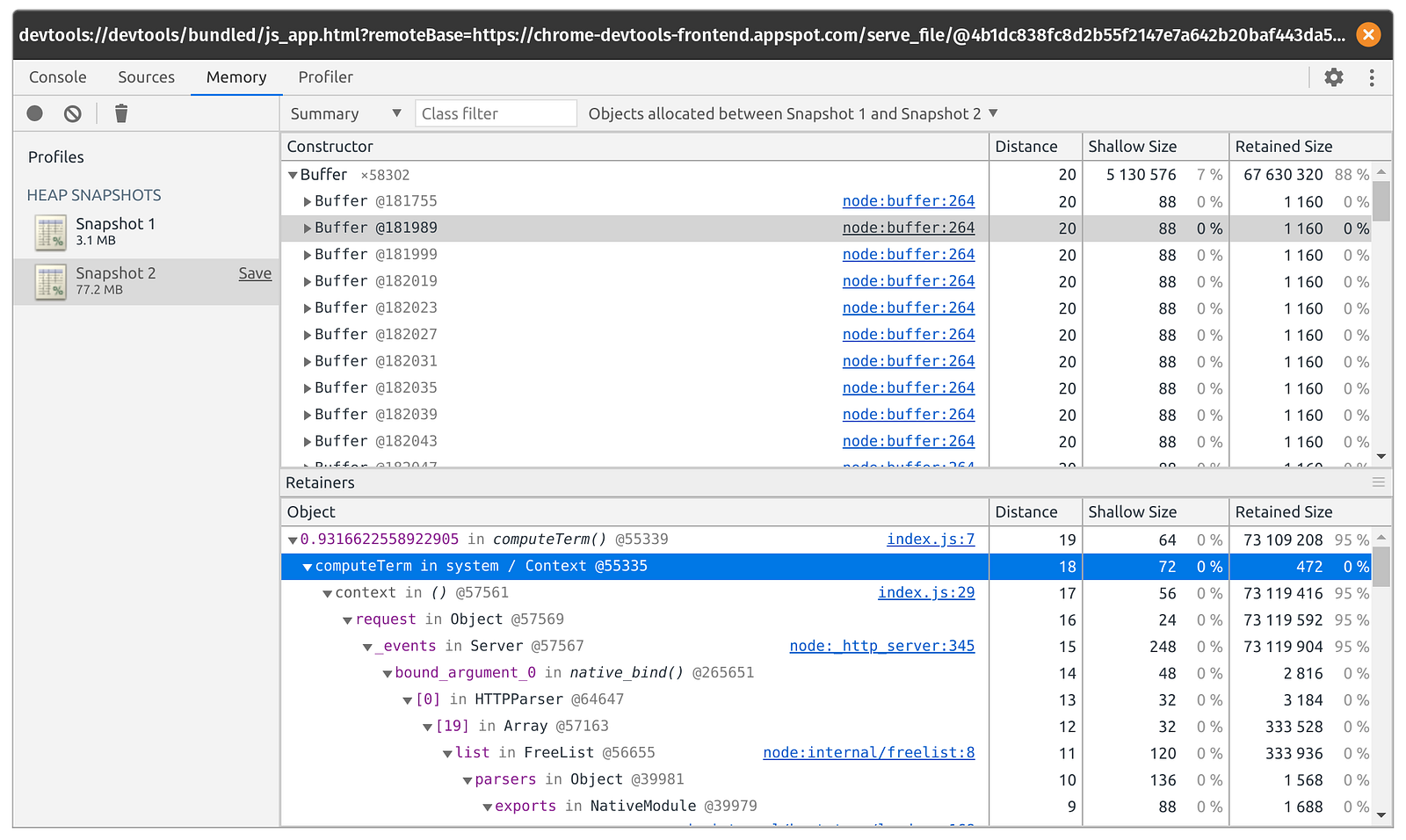
We can see that all the buffer objects are in memory and in the computeTerm cache. The reason the cache is leaking memory is that we are not clearing the cache periodically. The solution is to free memory after a timeout. Let's do that.
const http = require("http");

function computeTerm(term) {
    setTimeout(() => {
        delete computeTerm[term];
    }, 1000);
    return computeTerm[term] || (computeTerm[term] = compute());

    function compute() {
        return Buffer.alloc(1e3);
    }
}
const server = http.createServer((req, res) => {
    res.end(computeTerm(Math.random()));
});

server.listen(3000);
console.log("Server listening to port 3000. Press Ctrl+C to stop it.");
We clear the cache key after one second. This means the cached object stays in memory for a maximum of one second before it gets cleared. We are using one second since our program will only run for 30 seconds, so storing more would not let us show that the solution works. This isn't the ideal solution, but it can show how to go about tackling the leak. Let's load-test again and check the result in a Clinic report.

We can see that memory increases but not when we free the cache. Fine and dandy! We need to make sure we free the cache after a certain time so that it doesn't take up space in memory.
We can improve on this solution by using a more complete caching mechanism like LRU cache. But we won't go there today. A more proper robust solution that doesn't store caches in the machine's memory is to use dedicated caching servers like Redis or Memcached. We will explore this in a later article.
Promises
Promises help with futures. If there is a function that runs in the future, a promise gives us a handle to it, so that when it's over, we can do something with the response or execute other parts of the program. One thing is important when handling promises:
Promises get stored in memory and they do not clear until they are either handled or rejected
Let's see a simple scenario where promises might take a longer time to resolve, and stay in memory.
const http = require("http");

async function task (ms) {
    return new Promise(resolve => setTimeout(resolve, ms));
}

function getRndInteger(min, max) {
    return Math.floor(Math.random() * (max - min + 1) ) + min;
}

const server = http.createServer((req, res) => {
    task(getRndInteger(100, 20000));
    res.writeHead(200);
    res.end("Hello World");
});

server.listen(3000);
console.log("Server listening to port 3000. Press Ctrl+C to stop it.");
Here we have a task promise that gets resolved after a certain waiting period. We send random numbers from 100ms to 20s to the task function that it would take to resolve the promise. For each request, we create a promise that gets resolved within 100ms to 20s. Let's load-test this.

We see a steady increase in memory. But if promises are being resolved after a certain time period, why is the memory increasing? Because promises are staying in memory. We cannot keep running forever, waiting for the promises to resolve. What if they never resolve? Let's see the heap dump to confirm this is the case.

And we can clearly see in the snapshot that promises are in the memory. The program stopped, but the promises that never got resolved stayed in memory.
A common misconception is that Promise.race can solve this by "timing out" the promise. Let's look at why that doesn't actually free memory:
const http = require("http");

async function task(ms) {
    return new Promise(resolve => setTimeout(resolve, ms));
}

function getRndInteger(min, max) {
    return Math.floor(Math.random() * (max - min + 1)) + min;
}

function timeout(timer) {
    return new Promise((resolve) => {
        setTimeout(() => {
            resolve();
        }, timer)
    });
}

const server = http.createServer((req, res) => {
    Promise.race([task(getRndInteger(100, 20000)), timeout(500)]);
    res.writeHead(200);
    res.end("Hello World");
});

server.listen(3000);
console.log("Server listening to port 3000. Press Ctrl+C to stop it.");
We are using Promise.race, a function that resolves if any of the promises within an array gets resolved. We created a timeout promise of 500ms. But if we run this, we will see memory still leaking!
Why? Because Promise.race does not magically cancel the losing promises. The setTimeout inside our task will still run in the background until it finishes naturally up to 20 seconds later, preventing V8 from garbage-collecting the closure.
To truly prevent memory leaks from long-running operations in Node.js, you must explicitly abort them. Let's fix our code to properly clear the timeout and free the memory:
const http = require("http");

function getRndInteger(min, max) {
    return Math.floor(Math.random() * (max - min + 1)) + min;
}

const server = http.createServer((req, res) => {
    const ms = getRndInteger(100, 20000);

    // We store a reference to the timer
    const timer = setTimeout(() => {
        // Task completed successfully
    }, ms);

    // After 500ms, we explicitly cancel the background task
    // which immediately frees the memory closure!
    setTimeout(() => {
        clearTimeout(timer);
    }, 500);

    res.writeHead(200);
    res.end("Hello World");
});

server.listen(3000);
console.log("Server listening to port 3000. Press Ctrl+C to stop it.");
By using clearTimeout, we explicitly tell Node to stop the background operation, allowing the garbage collector to reclaim the memory.

We can see that memory is getting allocated, but since we are clearing the timeout, it's getting freed. It is always necessary to explicitly clean up resources for long-running tasks.
Conclusion
We have learned about how caching and promises can leak memory. Over the course of two tutorials, we learned about the four most common types of memory leaks in Node. The examples were of course short and only show the part that's required to demonstrate leaking scenarios. In the real world, the leaks are buried among hundreds of lines of code. But having a solid understanding can help us track down those nasty leaks without a lot of head-scratching.
Project Link: Github