Memory Leaks in Node.js: Part 1
Memory leaks in Node.js. We deep dive into memory leaks with the help of Clinic.js and how to prevent them.
It is very common for software to introduce bugs. How we manage them is the real issue. One of the most common bugs in production environments is memory leaks, and Node.js is notorious for being prone to this. So if you are a software developer who is building Node applications in production, understanding how memory leaks can happen and how to tackle them is an invaluable skill.
A Node application is a long-running process that is bootstrapped once until the process is killed or the server restarts. It handles all incoming requests and consumes resources until they are garbage collected by V8. Memory leaks occur when resources retain their references in memory and cannot be garbage collected. I won't go into detail about how V8's garbage collection works, but feel free to check out these articles on the topic.
Instead, I will focus on the four types of leaks that are very common and how to avoid them.
The 4 Types of Memory Leaks
- Global resources
- Closures
- Caching
- Promises
For Part 1, we will be exploring the first two types: global resources and closures. In Part 2, we will see how caching and unhandled promises can cause leaks as well.
Preparation
We will need the excellent Clinic.js and autocannon to debug these leaks. You can use any other load testing tool you want. Almost all of them will produce the same results. Clinic.js is an awesome tool developed by NearForm. This will help us do an initial diagnosis of performance issues like memory leaks and even loop delays. So, let's install these tools first:
npm install -g clinic
npm install -g autocannon
Now we are ready to catch some leaks!
Global Resources
This is one of the most common causes of leaks in Node. Due to the nature of JavaScript as a language, it is very easy to add to global variables and resources. If these are not cleaned over time, they keep adding up and eventually crash the application. Let's see a very simple example. Imagine this is the application's server.js:
const http = require("http");

const requestLogs = [];
const server = http.createServer((req, res) => {
    requestLogs.push({ url: req.url, array: new Array(10000).join("*") });
    res.end(JSON.stringify(requestLogs));
});

server.listen(3000);
console.log("Server listening to port 3000. Press Ctrl+C to stop it.");
Now, if we run:
clinic doctor --on-port 'autocannon -w 300 -c 100 -d 20 localhost:3000' -- node server.jsWe are doing two things at once: load testing the server with autocannon and catching trace data to analyze with Clinic. After the script runs for 20 seconds, a browser window should open up with something similar to this:
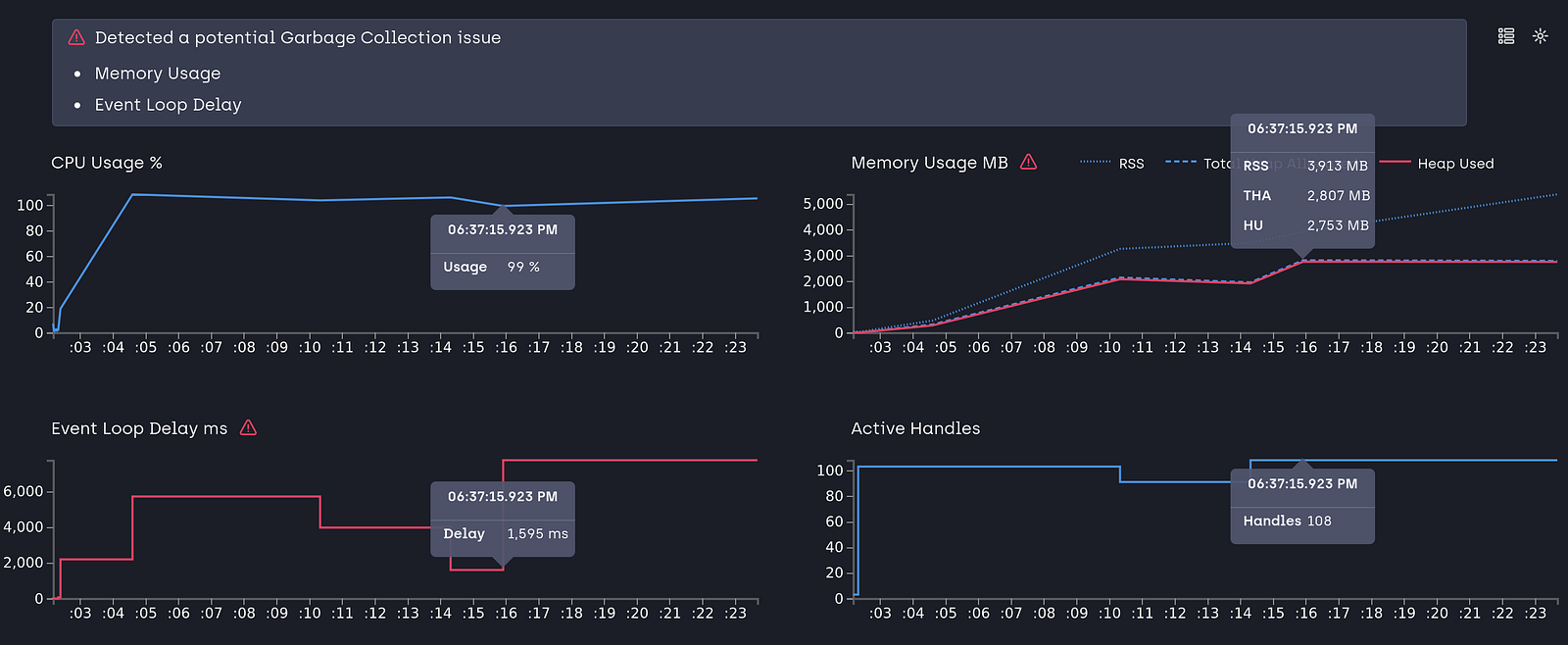
What we see is a steady increase of memory and delay in the event loop to serve requests. This is not only adding to the heap usage but also hampering the performance of the requests. Analyzing the code simply reveals that we are adding to the requestLogs global variable with each request and we never free it up. So it keeps growing and leaking.
We can trace the leak with Chrome's Node Inspector by taking a heap dump when the application runs for the first time, taking another heap dump after 30 seconds of load testing, and then comparing the objects allocated between these two. I won't go into detail on how to take a heap dump, but you can learn the technique from these two articles. When we follow this process, we see:
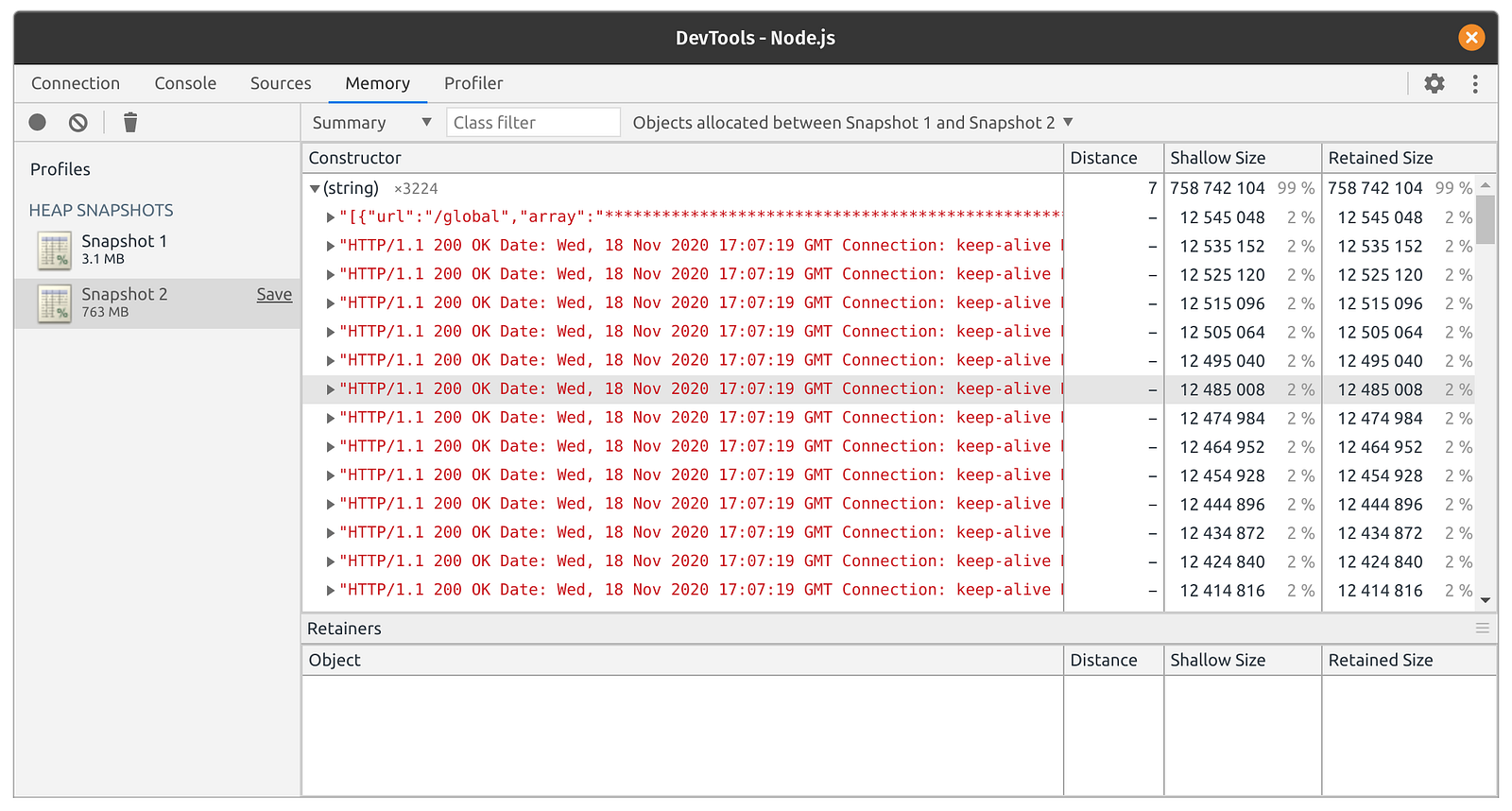
It is the global variable requestLogs that is causing the leak. Snapshot 2 is significantly higher in memory usage than Snapshot 1. Let's fix that:
const http = require("http");

const server = http.createServer((req, res) => {
    const requestLogs = [];
    requestLogs.push({ url: req.url, array: new Array(10000).join("*") });
    res.end(JSON.stringify(requestLogs));
});

server.listen(3000);
console.log("Server listening to port 3000. Press Ctrl+C to stop it.");
This is one solution. If you do need to persist this data, you could add external storage like databases to store the logs. And if we run the Clinic load testing again, we see everything is normal now:

Closures
Closures are common in JavaScript, and they can cause memory leaks that are elusive in nature. Read the Meteor blog post about how they tracked down a closure-based memory leak. We explore the situation here:
const http = require("http");

var theThing = null;
var replaceThing = function () {
    var originalThing = theThing;
    var unused = function () {
        if (originalThing) console.log("hi");
    };
    theThing = {
        longStr: new Array(10000).join("*"),
        someMethod: function () {
            console.log("hello");
        },
    };
};

const server = http.createServer((req, res) => {
    replaceThing();
    res.writeHead(200);
    res.end("Hello World");
});

server.listen(3000);
console.log("Server listening to port 3000. Press Ctrl+C to stop it.");
If we load test this code with autocannon and Clinic, we see:
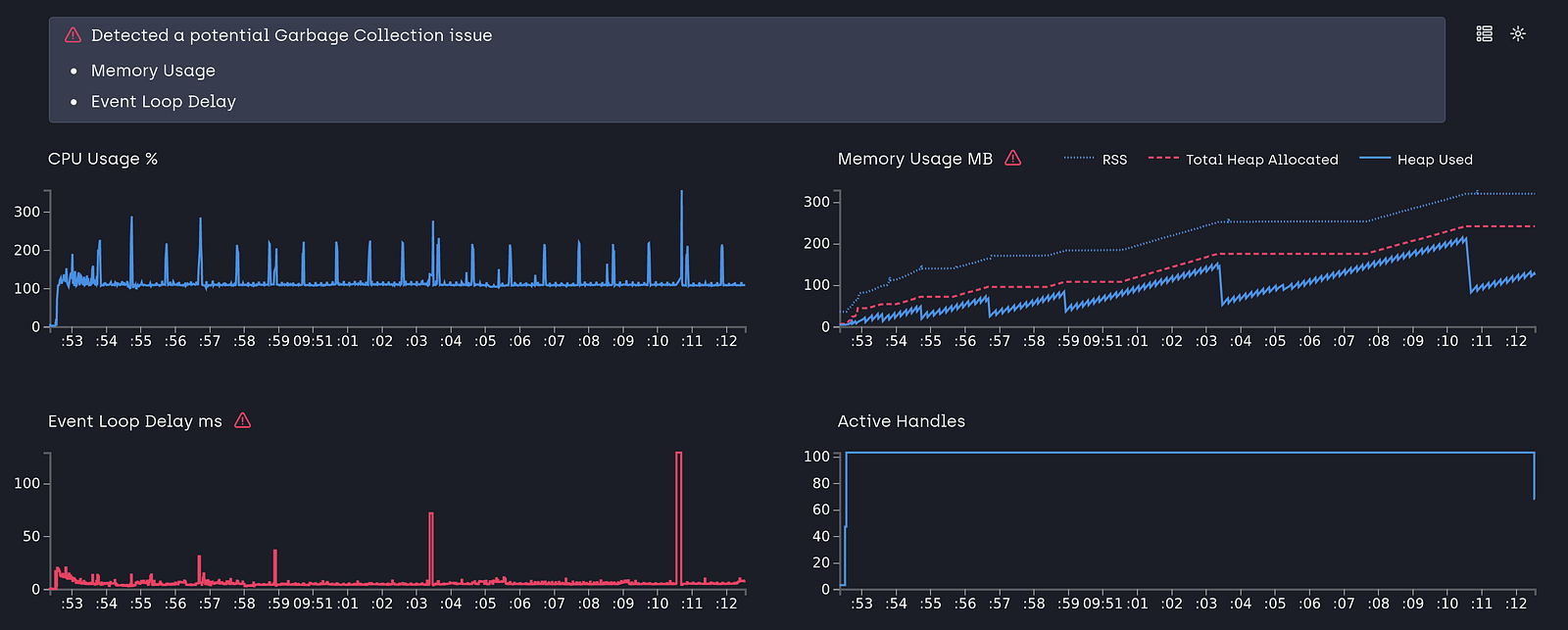
The memory is increasing fast, and if we wonder what is wrong with the script, it is clear that theThing is overwritten with every API call. Let's take heap dumps and see the result:
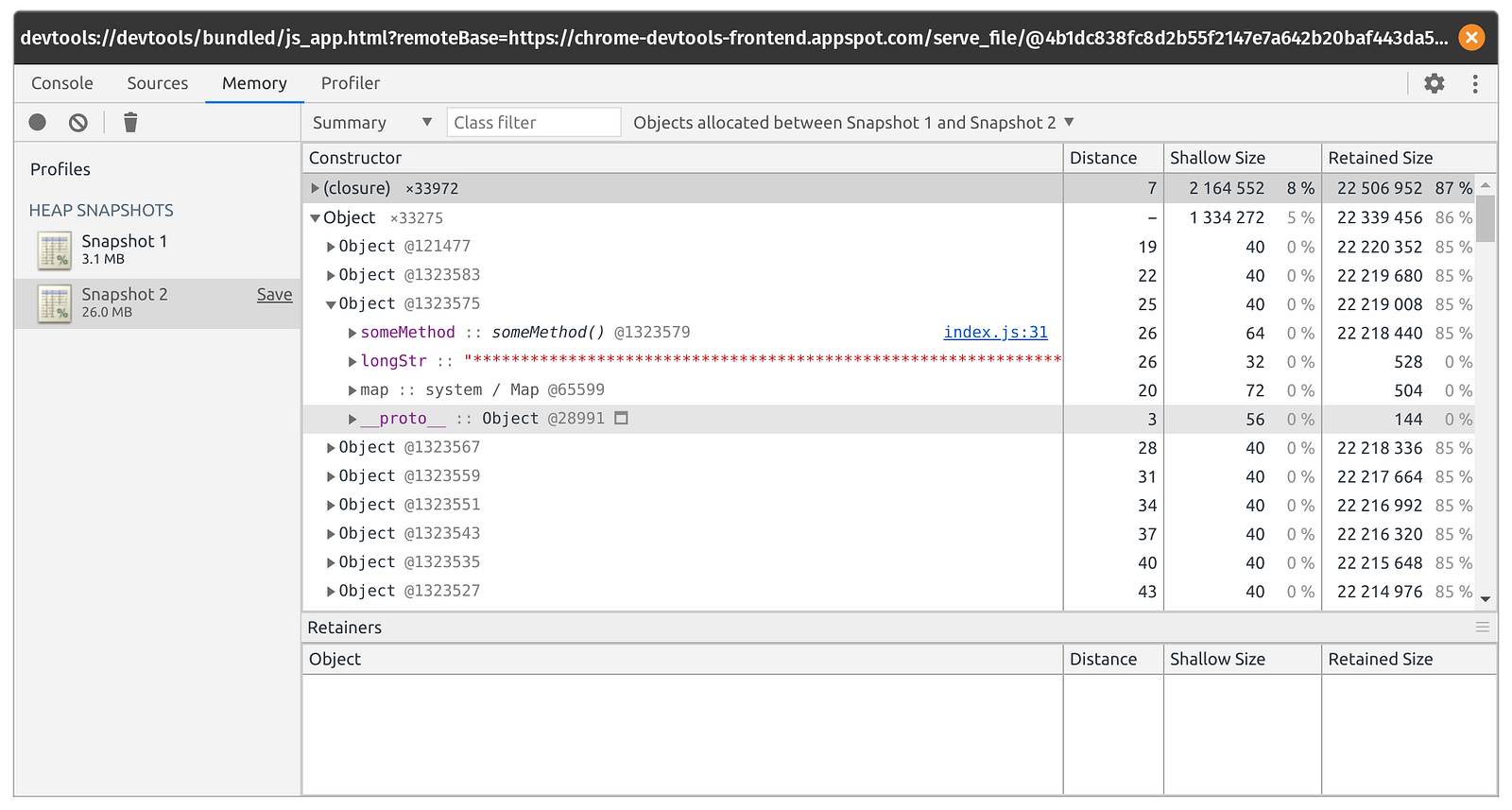
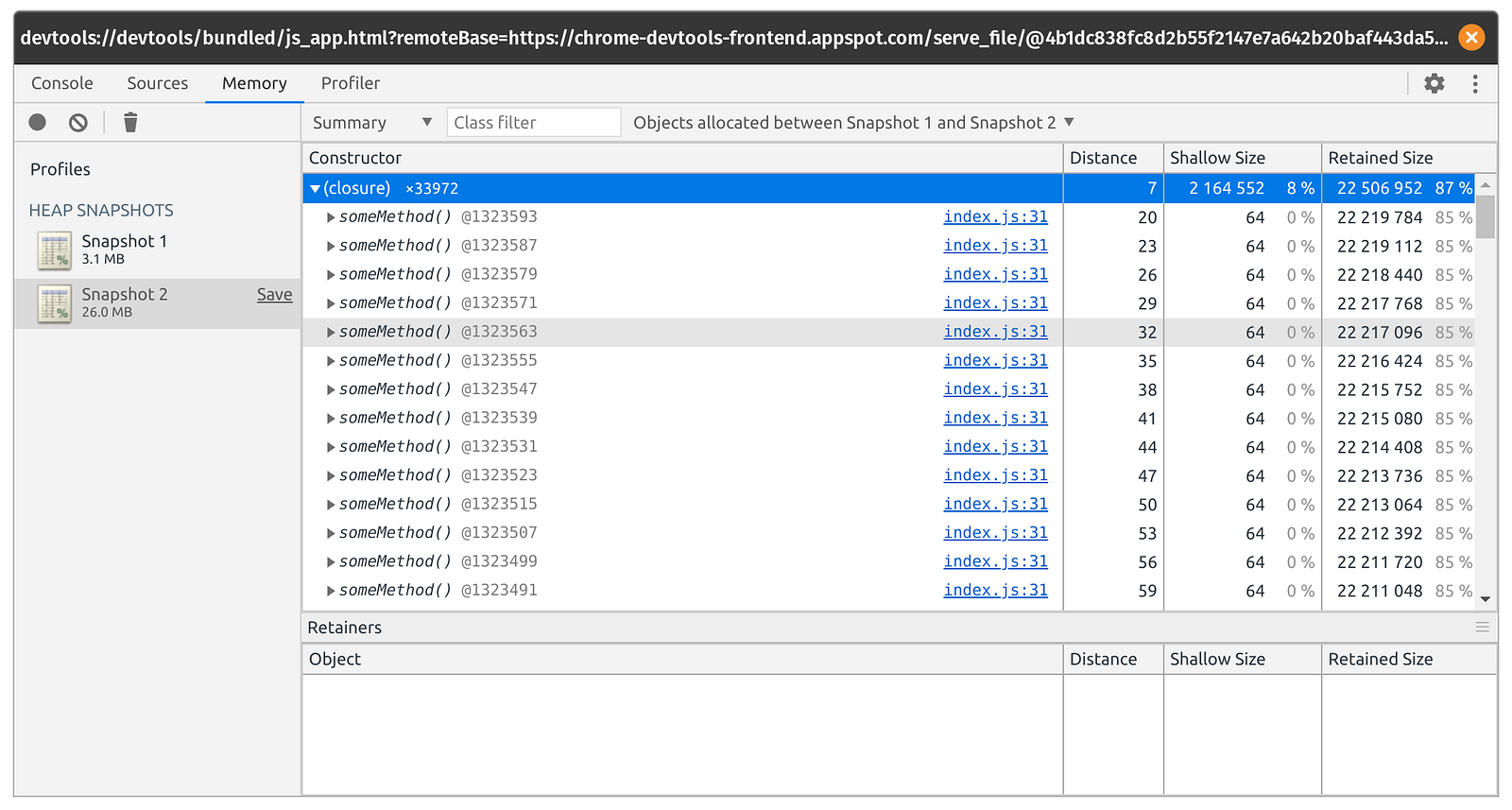
When we compare two heap dumps, we see that someMethod is kept in memory for all its invocations and it is holding onto longStr, which is adding to the rapid increase in memory. In the code above, the someMethod closure is creating an enclosing scope that holds onto an unused variable even though it is never invoked. This prevents the garbage collector from freeing originalThing.
The solution is simply nullifying originalThing at the end of the function. By freeing the object, the closure scope is no longer retained:
const http = require("http");

var theThing = null;
var replaceThing = function () {
    var originalThing = theThing;
    var unused = function () {
        if (originalThing) console.log("hi");
    };
    theThing = {
        longStr: new Array(10000).join("*"),
        someMethod: function () {
            console.log("hello");
        },
    };
    originalThing = null;
};

const server = http.createServer((req, res) => {
    replaceThing();
    res.writeHead(200);
    res.end("Hello World");
});

server.listen(3000);
console.log("Server listening to port 3000. Press Ctrl+C to stop it.");
Now if we run our load testing along with Clinic, we see:
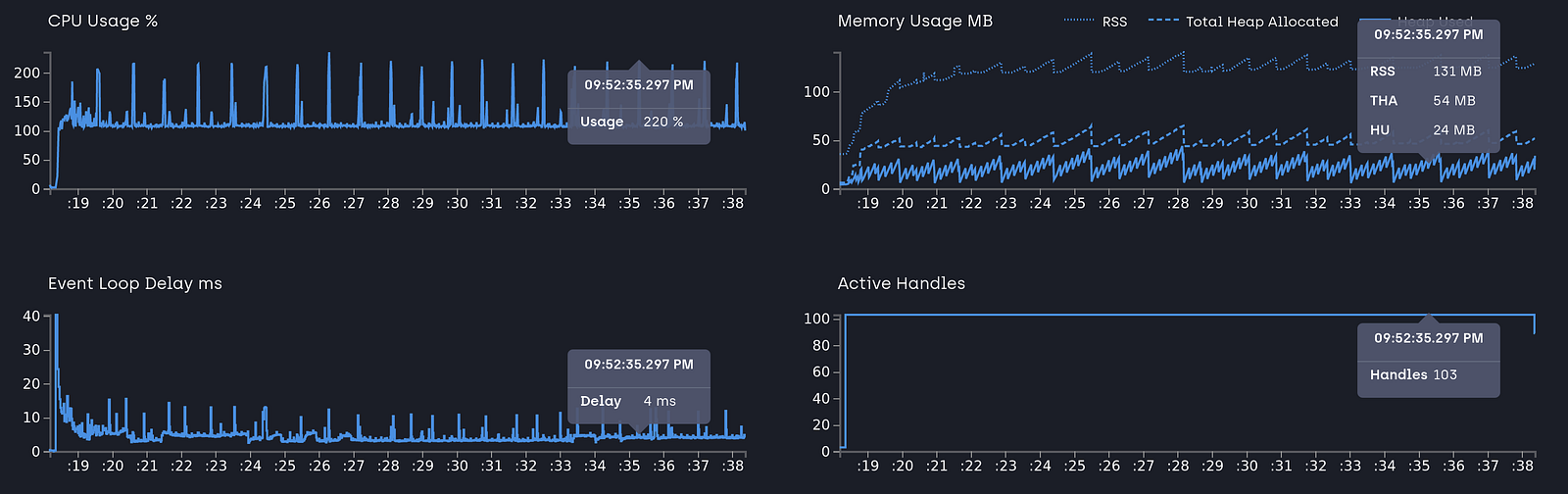
No leaking of closures! Nice. We have to keep an eye on closures, as they create their own scope and retain references to outer scope variables.
Conclusion
We have explored two major types of memory leaks in Node and how to detect them with the help of Clinic.js and Chrome's Node Debugger. In the next article, we will explore the other two types. The project description has resources on how to run the app and load test. It also includes the solution.